Center for Teaching & Mentoring
Pipeline/SSB9
The Faculty menu in PipelineMT moved to the new SSB9 interface on Monday, January 5, 2026. This page is designed to help faculty and staff find resources to support the transition. For detailed step‑by‑step instructions on navigating the updated Faculty menu, visit mtsu.edu/ssb/faculty.
Final Grades
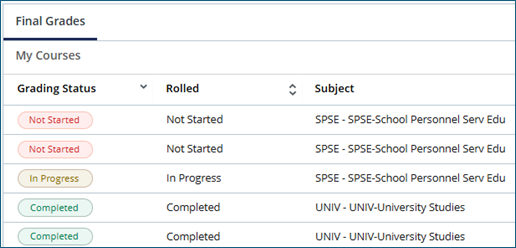
You may notice that some of your classes already say “In-Progress” instead of “Not Started” when you begin grading. This is due to grades of “W” that are already noted on the roster, not because you have already started your grading. When you have finished grading, it will show a green “Completed” on the status.
Remember that for some students who receive a grade of “F” you need to submit documentation for their last date of attendance. Details about this can be found here: mtsu.edu/one-stop/lda. However, in short remember that we need documentation for students who stopped attending after the mid-point of the term and did not complete their final exam. The midpoint date can be found on the Term Due Dates calendar. If you do not track attendance and a student stopped attending, you may use the midpoint date for their Last Date of Attendance in lieu of submitting documentation.

Other Pipeline/SSB9 Resources
SSB9 Faculty Class Lists (PDF)
SSB9 Faculty Class Email Lists (PDF)
SSB9 Faculty Grading Quick Guide (PDF)
Need troubleshooting for Pipeline/SSB9?
Contact ITD’s Academic and Instructional Technology division at 615-904-8189 or itdacad@mtsu.edu.
